 In this part of my tutorial I’ll show you how to make an Android toolbar and then show how to switch between screens in App Inventor.
We’ll finish up the icons we made in the previous tutorial. You can download them here. Then I’ll shrink them to size in Photoshop. Then we’ll put the toolbar together in App Inventor and use them to switch screens. The blocks used can be found after the video below.

If you like videos like this it helps to tell Google Plus with a click here [googleplusone]
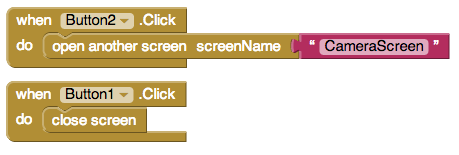
Blocks from Tutorial
Great tutorials. Love the fast pace.
I want to develop an app to drag-and-drop triangles next to other triangles and to change their colors. Should I be using sprites for the triangles or buttons or what? Any advice would be much appreciated?
That would be done with Canvas, which i will get to as soon as possible.
Why does it NOT work with AI Companion
Mine works with AI companion. The emulator is normally the only thing that won’t work.