Free Javascript Scripting Tutorial Part2

In this article I’ll explain Javascript Scripting. If you haven’t read my previous article on Javascript Scripting you should read it first. It provides a brief overview on the capabilities of Javascript. Here is the location of the code you’ll be working with, to see what you’ll learn. Here I’ll run you through some Javascript code and explain the following:

Continue reading Free Javascript Scripting Tutorial Part2

Marketing Examples: Radio Advertising

Now we are going to take a look at both an extremely powerful way to market as well as an easy way to lose money, radio advertising. The worst disasters in marketing that I’ve heard have all been in this form of marketing. People have told me stories of how they have lost hundreds and thousands of dollars marketing on the radio and they all occured because these people were uninformed on how much money it takes to market here.

I’ll now give you some tips so that you will know if radio marketing is for you. To properly market on the radio you must achieve 3 to 5 net impressions for 16 weeks and continue from that point on with 3 to 5 net impressions 3 out of every 4 weeks. On average this means you will have to run 10 to 16 ads per week to gain that many impressions depending on the strength of the station your going to run your ads on. This amounts to $4000 or more per week on. If that cost scares you do not use radio advertising. Continue reading Marketing Examples: Radio Advertising

Marketing Examples: Direct Mail Tips

Recent Gallup polls found that direct marketing was the most common communications medium during the late 90’s. Direct marketing refers to direct mail, mail order, coupon advertising, telephone marketing, direct response tv, door to door salesman, web sites, or any other method of marketing that aims to make a sale right then and there.

89 percent of marketing directors use direct mail to generate leads, while 48 percent use it to generate sales Direct mail is very expensive and should never be tried without the help of a marketing company. But as always it is best to be informed before trying any new marketing medium.

How you can gain information on how to set up a great campaign is to take a look at the best in direct mail.

Successful Direct Mail Marketers:

Marketing Examples Newspaper Ad Tips

In this article I’ll give you tried and true ways to succeed through newspaper advertising. If you haven’t read Writing Headlines that Sell, Writing Copy that Sells, Writing Copy that Sells Pt. 2, and Flyers and Brochure Tips, you should read those first. There you will find out how to write great copy for your marketing pieces. Now that your ready I’ll cover the specifics on how to market through newspaper advertising.

Newspaper Display Ads
You’ll receive fast results when you advertise in the newspaper, however you’ll escape the attention of those not in the market for your product right now. Because of this fact you want tho aim your ad at price concious now buyers.

You decide on how your ad should look in the same way that you did when picking out a classified ad. Look for ads that catch your eye and have a feeling consistent with your identity. Then look for that ad in papers 6 monthes, 1 year, and even 2 years in the past for that same ad to see if it is successful. Model your ads from those that have been successful.

Now place different ads in those papers in your area each providing a different coupon and ask customers to bring it with them to your store. Now analyze the pull of different papers and ads. From your analysis cut out the losers and then work on analyzing deeper which ads are effective and lastly which day of the week is most effective. Continue reading Marketing Examples Newspaper Ad Tips

Marketing Examples Flyer & Yellow Page Tips

Today I’m going to give some tips on posting Flyers and Yellow Page Advertising. One is an inexpensive way to market and the other is more than likely a waste of your marketing dollars.

Posting Signs

By posting signs you will gain an inexpensive way to establish identity with but a small investment in time. As with all forms of advertising you will once again benefit from others hard work. Below is a list of places to both find and post signs:

What is Object Oriented Programming

[youtube]http://www.youtube.com/watch?v=OQjPcS1tkDQ[/youtube]Welcome to a brief tutorial on what is Object Oriented Programming (OOP) and why the object oriented approach is considered the best way to program. Objects programming has taken the world by storm because of its flexibility and understandability, but learning the concepts behind it are sometimes a bit daunting. I will do my best to explain it in the simplest of terms. I assume you have a minor understanding of programming in this article, but if not, you can read my Javascript Scripting Tutorial to get prepared.

What Are Objects in Object Oriented Programming

A while back when a programmer sat down to write a program he/she would first ask “What does this program have to do?” They would then create a program that was filled with one action after another. This is known as procedural programming.

Now most programmers instead ask themselves, “What things are in this program?” Then they write code that explains what functions these things (objects) should be able to do. This is known as Object Oriented Programming (OOP).

Let’s say you are told to create a program that copies the functionality of a car. Here is a basic example of how you might do that with procedural programming versus OOP. Continue reading What is Object Oriented Programming

Javascripts Scripting Tutorial Part 1

[youtube]http://www.youtube.com/watch?v=zhQGj0SWZWY[/youtube]In the Javascripts Free Scripting Tutorial I will completely cover all of the capabilities Javascript offers. Javascript is a scripting language that allows you to make your website more interactive. While HTML provides the structure and CSS provides the styling, Javascript allows you to add functionality to your website that users visitors expect.

I provide a tutorial on How to Use CSS Here and you can Learn How to Write HTML W3C Here.

Introduction to the Scripting Tutorial

In this first article, I’m going to give you a brief overview on how Javascript works. In those articles that follow I will teach by walking you step-by-step through real working Javascript Scripts.I’m going to assume you have read or watched the above HTML and CSS tutorials. Anytime I refer to Javascript Code, I’m talking about a series of commands I am making to the browser. Continue reading Javascripts Scripting Tutorial Part 1

Diet Nutritional Plan: Update After 5 Months

Many people that read my articles might not know, but one of my first articles was on creating the perfect diet. If you click the Diet Nutritional link at the top of the page you can read the whole story.

We’ll since I haven’t talked about it in a while many people have written asking if it failed? Nope, I started at the beginning of November at 248 pounds and now after 5 months I’m at 184 pounds. That is a total loss of 64 pounds in 5 months! I achieved that weight loss:

  • Without Exercising
  • Without counting carbs
  • Without watching sugar intake
  • Without diet supplements
  • Without diet pills

Continue reading Diet Nutritional Plan: Update After 5 Months

Marketing Examples: Flyers & Brochure Tips

Today, I’m going to provide specific tips on creating inexpensive Flyers and Brochures. If you haven’t already, read my articles on Copy Writing:

Flyers and Brochures

Circulars or flyers are inexpensive ways to sell a specific product or service. On the other hand brochures can be inexpensive or quite expensive ways to prove to your customers that your business is for real.

I’ve never known these two mediums to work without the use of tele-selling or canvassing. However as the strength of personal letters increases in cooperation with other mediums, the same holds true for circulars. Brochures on the other hand should be used to enforce your identity, sell services, and high value products. Continue reading Marketing Examples: Flyers & Brochure Tips

Marketing Examples: Writing Copy Pt 3

I’ve been getting a lot of emails asking for more tips on writing effective copy, so I compiled more tips for you. Enjoy!

A Few More Tips on Strengthening Your Copy

  • Straightforward Copy should be devoid of style or rhetoric it merely states the facts.
  • Story copy starts off with a human interest story and then comes a story in which the moral is that you should buy the product.
  • You and me copy speaks directly to the customer in a chatty way just as a salesperson would talk with a prospect.
  • Imaginative copy heightens the reader’s interest by describing it in fantastic ways. Continue reading Marketing Examples: Writing Copy Pt 3

How to CSS Style HTML Video Series

A Complete CSS Video Series for Free

Note: Click the High Definition Button and Full Screen Button, to see these videos at the highest quality level.

I hope everyone enjoyed the series of articles I wrote recently on CSS. You definitely could add CSS Expert to your resume if you read the whole thing. But, where are the videos? I’ve assembled 6 videos below that go through every subject covered in the articles. I hope you enjoy them. (Hint: Comment Below)

If you haven’t read my Complete HTML W3C Tutorial, you should do that first.

How to CSS Style HTML, Video 1

[youtube]http://www.youtube.com/watch?v=XZOfG4moMx4[/youtube]

In this video:

1. I introduce Cascading Style Sheets

2. I show you how to add CSS to your HTML code

3. I go over how changing one tag, effects the other tags.

4. Then I go over CSS classes.

5. How to edit CSS class properties

A whole lot more…
Continue reading How to CSS Style HTML Video Series

Adding CSS Style to HTML: Layout & Positioning

In this article I’m going to completely cover layout and positioning with Cascading Style Sheets and xHTML. If you haven’t read/viewed my xHTML W3C Tutorial or my Adding CSS Style to HTML article, you should do that first.

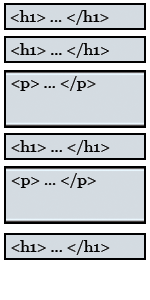
Block Element DiagramIt is very important to enclose all of your code into a series of block elements. Everything on your page should be enclosed by a Header or Paragraph Tag. If you do that, not only will you be xHTML compliant you’ll also have no problem with positioning your content.

If you forgot, here is a list of every block element tag:

<blockquote> : Block Quote
<div> : A block container that we’ll talk about soon
<dl> : Definition list
<form> : Form
<h1>, <h2>, … <h6> : Header Tags
<hr> : Horizontal Rule
<ol> : Ordered List
<p> : Paragraph
<table> : Table
<ul> : Unordered List Continue reading Adding CSS Style to HTML: Layout & Positioning

Adding CSS Style to HTML: The Box Element

The Box Element

Cascading Style SheetsIn the last article, I showed you how to style just about everything with Cascading Style Sheets. In this article I’ll cover everything there is to know about the box element.

CSS treats everything as if it was a box. Every box has the following properties:

Content Area: Which holds all of your content including text, images, etc.
Padding Area: Blank area that lies between the Content Area and the Border
Border: Optional line, that lies between the Padding and Margin
Margin: Optional area, that surrounds all of the other parts of the box.

Examples of How to Edit Boxes with CSS

Here I’ll give you many examples to pick from. Think of it as a cookbook of box designs. Continue reading Adding CSS Style to HTML: The Box Element

Adding CSS Style to HTML

Using CSS to Style your Site

Cascading Style SheetsIf you have watched my HTML Tutorials your probably asking yourself, “When is he going to talk about CSS?” Well, today is the day. Cascading Style Sheets (CSS) are used to completely control the look and feel of your website.

When HTML was merged with xml to become xHTML, CSS took off because now we were able to create our own tags and the possibilities became endless. You define how you want to add style to your pages in one of two ways. You embed the CSS styling rules directly into the xHTML file or you link to an outside CSS file. It’s better to link to an outside file so through out this course that is what we’ll do. Continue reading Adding CSS Style to HTML

What’s the Difference Between xhtml and html?

[youtube]http://www.youtube.com/watch?v=tB5ozZJbD34[/youtube]I was surprised to get this question emailed to me after my HTML W3C Tutorial. This article will be a bit more technical, but I’ll try to keep it light on jargon. By the end of the article, you’ll be able to tell people you know how to write Extensible Hypertext Markup Language version 1.0 Strict that is W3C complaint!

First W3C stands for the World Wide Web Consortium (W3C). They are the group of people that tell everyone how to write HTML and Cascading Style Sheets properly, among other things. What is well written HTML (W3C)? It is HTML that can be viewed on most any device with a browser.

The most current version of HTML W3C is referred to as XHTML 1.0 Strict. XHTML is now known as eXtensible Hypertext Markup Language because it has borrowed format from another language called XML. XML is a language that is used to markup, or structure any type of document, with tags just like HTML. The major difference between XML and HTML is that with XML you can create your own tags, instead of being stuck with the limited quantity found in traditional HTML.

Continue reading What’s the Difference Between xhtml and html?

PHP Form Mail Script

I’ve had some requests to show you the php script I used to process and send the email from the HTML W3C Tutorial. So here you are. I’ll go through everything, like before, by including the code in black and white and my descriptions of the code in a blue box.

Code is here in a zipped archive.

<html>

You begin a PHP script with the HTML tag, just like normal HTML. You would save the file with the extention .PHP instead of .html though.

<head><title>PHP Mail Sender</title></head>

Here is the definition of the header section using HTML tags. I trust you know what these means. If not view the HTML W3C tutorial here.

Continue reading PHP Form Mail Script

Learn How to Write HTML W3C

[youtube]http://www.youtube.com/watch?v=Ncy6LDjSiX4[/youtube]Today, I’m going to completely explain the Hyper-Text Markup Language (HTML). You’ll probably be surprised by how uncomplicated it is. I hope?

A web browser reads HTML, which is just a text file filled with tags. Tags are just words or individual characters in angled brackets, that tell the browser what test needs emphasis, is a paragraph, where to get images, how to take a visitor to another page, etc. There are 89 total tags, but most of the time you will use only 20 total tags. Here are the most common tags:

  • <!DOCTYPE> : Defines what type of document your using. This will almost always be the same on every HTML page you ever create.
  • <a> : Defines a link, that if clicked will take the user to another web page
  • <b> : Tells the browser, you want the text inclosed to be bold.
  • <body> : Your main content will reside between to body tags
  • <br /> : Creates a line break.
  • <em> : Italicizes the text between these tags.
  • <form> : Defines an area in which the visitor can interact with your website.
  • <h1> to <h6> : Defines text that you want to emphasize, such as a title.
  • <head> : You describe the content of the document, between to head tags.
  • <hr /> : Draws a horizontal line on your web page, to separate content.
  • <html> : Defines the beginning and ending of your html page.
  • <img /> : Tells the browser, you want to insert an image.
  • <li> : Defines an item in a list, you wish to bullet, or number
  • <ol> : Tells the browser, an ordered list is about to be defined
  • <p> : Defines that a paragraph of text is being defined.
  • <table> : Tells the browser, you’d like to present your information in table format.
  • <title> : Defines the title of your document
  • <ul> : Tells the browser, an unordered list is about to be defined

Continue reading Learn How to Write HTML W3C

Free SEO & Page Rank Software

[youtube]http://www.youtube.com/watch?v=hWJx_N0VUf0[/youtube]Here I’ll show you some free tools that will tell you if you have a good website. These tools also show you exactly what may be wrong and how to fix them.

Websitegrader.com

Website Grader is a free seo tool that measures the marketing effectiveness of a website. It provides a score that incorporates things like website traffic, SEO, social popularity and other technical factors. It also provides some basic advice on how the website can be improved from a marketing perspective. I’ll list here everything you’ll find out with Website Grader: Continue reading Free SEO & Page Rank Software

Indirect Hypnosis : The Introduction to Neurolinguistic Programming

I started this website to answer all questions posed to me. Most times, the questions you ask are great. I’ve answered many of them. I recently received my favorite from Doug Schlesinger. “Teach me how to perform the Jedi Mind Trick.” Well, you might think this is a joke. Obviously I can’t teach a fictional mind trick. I can however teach you all the skills needed to convince people of most anything.

Welcome to the world of Neurolinguistic Programming! NLP is used in nearly every form of professional marketing you consume on a daily basis. It is a branch of psychology, first created, by Richard Bandler and John Grinder. Most of the books and papers they wrote on it are out of print, but your in luck, because I’ve read them all.

NLP techniques are used to figure out how a person’s brain processes information. More specifically how a person:

  • Reasons
  • Gathers Information
  • Decides on Preferences
  • Deals with Stress
  • Emotes
  • Reacts to Situations
  • Makes Decisions

Continue reading Indirect Hypnosis : The Introduction to Neurolinguistic Programming

Upload Video Files to Multiple Sites

[youtube]http://www.youtube.com/watch?v=d2-npuBBfHM[/youtube]This article answers a question from a recent email. “…It’s great that I can post to multiple social networks automatically … wouldn’t be great if I could do the same with video?” Well if you missed the previous article, I explained how to automatically post your post’s to multiple social networking sites.

There is a website that posts your video’s to multiple sites as well. It’s called Tube Mogul! Tube Mogul aggregates video-viewing data from multiple sources to give publishers an improved understanding of when, where and how often their videos are watched, track and compare what’s hot and what’s not, measure the impact of marketing campaigns, gather competitive intelligence, and share the data with colleagues or friends.

Continue reading Upload Video Files to Multiple Sites