 This is the first video in a series in which we will make a professional weather app for Android. In this video I will show how to parse JSON Data with App Inventor. I also cover the App Inventor Web component, using Location Sensor, converting JSON data into an App Inventor List and much more.
I pull all the weather data from weather.gov. If you want international weather data I’d use the JSON feed from the Weather Underground. All of the blocks follow the video.
If you like videos like this, it helps to share them with Google Plus with a click here [googleplusone]
The activity called to turn on GPS on Android device : android.settings.LOCATION_SOURCE_SETTINGS
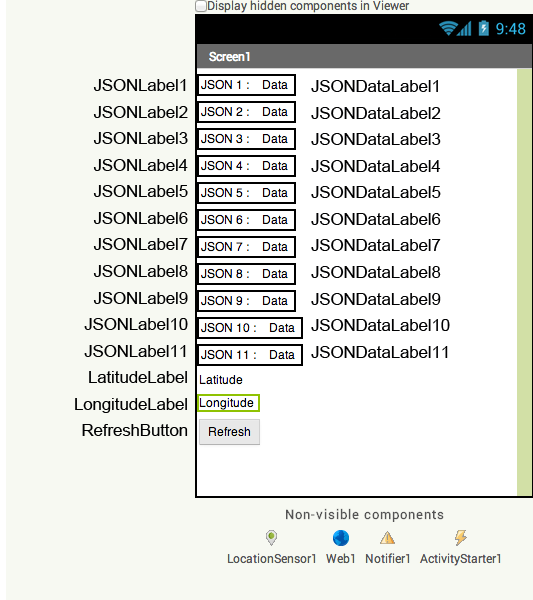
Design for the Android Weather App
Click the image below to view it full screen
Blocks used for the Android Weather App
Click the image below to view it full screen

Thanks again for this great tutorial!
I had a problem but I solved it on my own :D. Appereantly some countries get a comma instead of a dot so the url wont work. I changed my mobile languages to english and it worked. The following countries use a comma instead of a dot: Bahase Indonesia, Deutsch (Österreich), Deutsch (Deutschland), Espanol (Argentina), Francais (France), Dansk, Nederlands (Nederland).
Yes sorry about that. I didn’t know that when I was making this tutorial.
where is the continue of this secuense tutorial i need to finish but you did not finish
I have every Android tutorial here on one page.
Hi,
first of all i want to thank you for these excellent tutorials keep up the good work 🙂 And i have one problem when i try to load JSON data i get the following run time error “The operation select list item cannot accept the arguments:……”the rest is data. Thank you again.
Thank you 🙂 You get that error when you are trying to grab a list item that doesn’t exist. There is an error in the numbers entered some place. I tested my app and it still works, so there is probably a little typo in your code there.
Tnx a lot for the help. I will try to see what I did wrong.
A LOT OF THANKS, MR. Derek…
I get the same error, this is because the weather website didn’t accept my latitude & longitude…
When i write in the address bar:
http://forecast.weather.gov/MapClick.php?lat=29.973789&lon=30.916306&FcstType=json
it says “Invalid zone code”
You’re very welcome 🙂 You get that error because this weather service only works in the US and canada. You can do exactly the same thing in the same way internationally by using the weather undergrounds feed http://www.wunderground.com/weather/api/?MR=1
Thanks for the tutorial, I was also having the same error, and as you said that the website provide the services only for US and Canada.
I want to ask is possible to put any any website URL to parse the Data, or that particular website should provide JSON data.
As I am trying to build an Stock Quote Application, so where can I parse data for this, if you could suggest.
You’re very welcome 🙂 I think this is the information you want http://www.tair.info/faqs-and-how-tos/ai2-how-tostutorials/rss-example-feedme-ai2/#xmlParse
Thanks for your response 😀
Greate Greate tuturial! its amazing what you do!
Thank you 🙂 i’m glad you enjoyed it.
thanks lot it’s a great tutorial. i applied it and i went even more.but i came with some issues. i was doing for FIDS (Flight Information Display System). but i got 100 rows and 5 column. is there any way i can get Large JSON data and arrange them in a table at app inventor. thanks again for your time.
salim
salim2k2@gmail.com
How to get feed from http://www.wunderground.com?
It works in pretty much the exact way as I did it here. You just need an api key. Everything else is the same.
One of the best tutorials I’ve ever watched! Awesome job. thanks a million.
Thank you 🙂
After you finish this kind of aplication, you can submit them to google play?
Yes you can put app inventor apps on Google Play
The best tutorial i have ever seen.Following your all videos
Thank you very much 🙂