 In this tutorial we take it to the next level. In the last video we designed the interface for our Android conversion app. This time we will create the whole backend and finish the app.
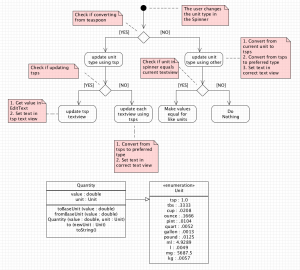
The goal of this tutorial is to show you how to make an entire app in one video. We’ll cover use case descriptions, activity diagrams, class diagrams, flexible ways to solve our conversion problem, dynamically changing classes and much more. If you don’t understand everything don’t worry about it. This tutorial is all about seeing it all so you’ll grasp what is coming next.
If you like videos like this it helps to tell others on Google Plus with a click here [googleplusone]
Here is the entire package for download Android Conversion App.
Note : In the video I set up the emulator to lvl 20, change to 19 in your build.gradle file and try 19.1.0 as I show below. I was trying to do too many things and that was a mistake.
UML Diagrams
Click the image below a few times to view it full screen
Use Case Description
Code From the Video
/src/build.gradle
Quantity.java
MainActivity.java
Android Manifest.xml
Hi Derek, great tutorial on all of the tutorials.
I am a beginner.
I would like to ask you if I want to make an android game like Jetpack Joyride, which software I need?
Is Android Studio enough?
Or I need to use Unity to make it?
I want to make a game which has the menu just like other android app. And I need to select the start button to play not just open the game then it start.
Hi Cedric,
Yes Android Studio is enough to make that game. The hard part will be designing the graphics. I’ll cover how to make games very soon.
Hi Derek,
How do you install and run an app on an android device?
Thanks for the great tutorials.
You’re very welcome 🙂 Plug your device into the computer. When you click for the app to run your device will show up as an option to run on it. That is basically it.
Another question. In which part of your Java tutorial do you cover enums? 🙂
Recently I covered enums in an Android tutorial.
Hi Derek, I implemented this same app in a different way,
what do you think about this approach?
MainActivity.java
activity_main.xml”
units.xml
Hi Derek,
Thanks a lot for every thing. I have been following you step by step since first video and so far so good.
This time I am having this problem:
I keep getting this error:
Error: error: missing method body, or declare abstract
In the line (089) public void onNothingSelected(AdapterView arg0)
Any idea what I have done wrong! Thanks a lot.
You’re very welcome 🙂 Make sure you don’t have a stray ; some place. That normally causes that error.
There is a slight miscalculation. mg and kg are measures of weight, not volume. A teaspoon of molasses will not weigh the same as a teaspoon of flour. But videos are most informative and very professional. Thank you
Thank you for the input 🙂 Yes I was measuring everything as if it was water. I know that isn’t accurate.