Category Archives: CSS Style HTML

Mega Drop Down Menu

Mega Drop Down MenuIn this video we create a responsive and fluid mega drop down menu based on the Boston Globe.

One of you guys told me their employer hires people based on how well they can recreate the Boston Globes website, so I decided to recreate the mega drop down menu used there in this one video. The Boston Globes site is considered by many to be a great example of responsive web design so I thought we could learn a lot by remaking it.

You may also enjoy these videos : Learn CSS3 in One Video, Responsive Web Design, and Learn HTML5 in One Video. Continue reading Mega Drop Down Menu
CSS Problems Solved

CSS Problems SolvedIn this tutorial I’m going to solve a bunch of problems people have with CSS. We’ll focus on common layout problems. We’ll create a 2 & 3 column layout the easy way. We’ll solve common alignment issues. We’ll do many things with backgrounds. We’ll focus on the most commonly used cross browser CSS3 tricks. We’ll style tables, forms, create galleries and so much more.

I also have a tutorial in which I teach CSS3 in one video. Continue reading CSS Problems Solved

Learn CSS3 in One Video

Learn CSS3 in One VideoIn this tutorial I help you learn CSS3 in one video. We’ll cover importing style sheets, selecting elements, padding, margin, border, background, fonts, absolute / fixed / relative positioning, float, clip, overflow, HTML5 styling, page layouts, img, pseudo classes, counter-increment, buttons, cursors, slide shows, white space, table styling, shadowing, RGB, HSL, opacity, border-radius, repeat, gradients, animations and more. A transcript follows the video below. Continue reading Learn CSS3 in One Video

How to Layout a Website 4

How to Layout a WebsiteHere I finish off the website I started creating in part 1 of How to Layout a Website.

I finish up the right sidebar and the footer. Then I move on to clean up any loose ends that exist.

I’ve made this whole website out of my head using just a photograph as a reference so that you can see how a designer thinks. Maybe more importantly you get a chance to see what mistakes I make and how to easily correct those mistakes.

Continue reading How to Layout a Website 4

How to Layout a Website 2

How to Layout a Website 2In the last video / article How to Layout a Website, I showed you how to set up the header, import Google Web Fonts and the basics of CSS.

In the tutorial, I’ll show you how to make pretty complicated layouts. I show you how to overlay divs and how to make adjustments with CSS until everything looks perfect.

If you need to brush up on HTML or CSS here are video tutorials on those subjects.

Continue reading How to Layout a Website 2

Repeating Backgrounds

Repeat BackgroundI was asked how to make a background that is seamless by 3 different people. So, in this tutorial I’ll show you how to make repeating backgrounds.

Seamless website backgrounds are useful because they allow a developer to use beautiful backgrounds without worrying about the websites file size.

There are numerous ways to make a seamless tile background, but I’ll show you the easiest way I have found using Photoshop.

Continue reading Repeating Backgrounds

Horizontal Menu Tutorial

Menu HorizontalIt’s not very often that I make a video tutorial that I really love, but I think I did it today!

In this video tutorial I show you everything that goes into making a full website design with a Horizontal Menu.

I not only show you everything, I try to do it using the least amount of code possible. In doing that I think you will be able to easily make your own web designs.

Continue reading Horizontal Menu Tutorial

Website Layouts with CSS

CSS Website LayoutsIn this CSS Video Tutorial I’ll show you how to layout a whole web page using Cascading Style Sheets. I’ll create headers, content areas, footers and numerous sidebars. I’ll also show you how to make major changes to a website layout with a limited amount of coding.

If you’d prefer to read this information in an article see this CSS Layout and Positioning.

All of the code used can be found in the article above and also follows the video tutorial. If you have any questions or comments leave them below. You can use the code in any way that you wish.

Continue reading Website Layouts with CSS

CSS Video Tutorial Pt 3

CSS Video TutorialIn this tutorial I’ll cover most every Cascading Style Sheet property not covered in CSS Tutorial Pt 1 and CSS Text Properties. Specifically I’ll show you how to style:

  • Backgrounds
  • Tables
  • Lists
  • Cursors

I’ll also introduce you to the box element and its numerous properties. If you’d prefer to read this information please see Learn CSS.

Continue reading CSS Video Tutorial Pt 3

CSS Video Tutorial

CSS Video TutorialIn this video tutorial I will begin going over every way you can style your web pages using Cascading Style Sheets (CSS). I specifically cover in this CSS Video Tutorial how to:

  • Link to External Style Sheets
  • Embed Style Sheet Definitions in HTML
  • What they Mean by Cascading
  • How CSS’s Work Differently with Inline versus Block Elements
  • How to Define Style Elements

Continue reading CSS Video Tutorial

CSS Menu Drop Down

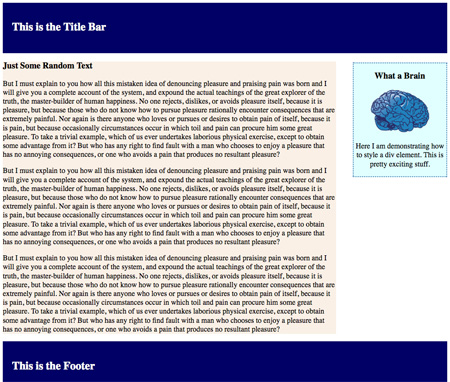
A few articles ago I showed you how to make a basic website layout in my Styling HTML with Cascading Style Sheets Tutorial. Was it the most beautiful page? Not exactly, but it was easy to understand, which was the point in making it simple. Here it is if you missed it.

Simple Two Bar CSS LayoutClick here to be taken to the web page to your left.

Feel free to do whatever you like with the code and if you have any problems editing it drop me a comment below.

So, we have a simple layout with a title bar, footer, side bar and main content div setup. This is the basic layout used for all WordPress themes. And, yes I am going to create a tutorial on designing custom WordPress themes very soon.

Continue reading CSS Menu Drop Down

How to CSS Style HTML Video Series

A Complete CSS Video Series for Free

Note: Click the High Definition Button and Full Screen Button, to see these videos at the highest quality level.

I hope everyone enjoyed the series of articles I wrote recently on CSS. You definitely could add CSS Expert to your resume if you read the whole thing. But, where are the videos? I’ve assembled 6 videos below that go through every subject covered in the articles. I hope you enjoy them. (Hint: Comment Below)

If you haven’t read my Complete HTML W3C Tutorial, you should do that first.

How to CSS Style HTML, Video 1

[youtube]http://www.youtube.com/watch?v=XZOfG4moMx4[/youtube]

In this video:

1. I introduce Cascading Style Sheets

2. I show you how to add CSS to your HTML code

3. I go over how changing one tag, effects the other tags.

4. Then I go over CSS classes.

5. How to edit CSS class properties

A whole lot more…
Continue reading How to CSS Style HTML Video Series

Adding CSS Style to HTML: Layout & Positioning

In this article I’m going to completely cover layout and positioning with Cascading Style Sheets and xHTML. If you haven’t read/viewed my xHTML W3C Tutorial or my Adding CSS Style to HTML article, you should do that first.

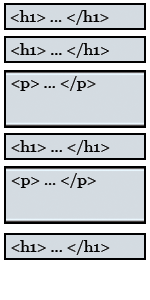
Block Element DiagramIt is very important to enclose all of your code into a series of block elements. Everything on your page should be enclosed by a Header or Paragraph Tag. If you do that, not only will you be xHTML compliant you’ll also have no problem with positioning your content.

If you forgot, here is a list of every block element tag:

<blockquote> : Block Quote
<div> : A block container that we’ll talk about soon
<dl> : Definition list
<form> : Form
<h1>, <h2>, … <h6> : Header Tags
<hr> : Horizontal Rule
<ol> : Ordered List
<p> : Paragraph
<table> : Table
<ul> : Unordered List Continue reading Adding CSS Style to HTML: Layout & Positioning

Adding CSS Style to HTML: The Box Element

The Box Element

Cascading Style SheetsIn the last article, I showed you how to style just about everything with Cascading Style Sheets. In this article I’ll cover everything there is to know about the box element.

CSS treats everything as if it was a box. Every box has the following properties:

Content Area: Which holds all of your content including text, images, etc.
Padding Area: Blank area that lies between the Content Area and the Border
Border: Optional line, that lies between the Padding and Margin
Margin: Optional area, that surrounds all of the other parts of the box.

Examples of How to Edit Boxes with CSS

Here I’ll give you many examples to pick from. Think of it as a cookbook of box designs. Continue reading Adding CSS Style to HTML: The Box Element

Adding CSS Style to HTML

Using CSS to Style your Site

Cascading Style SheetsIf you have watched my HTML Tutorials your probably asking yourself, “When is he going to talk about CSS?” Well, today is the day. Cascading Style Sheets (CSS) are used to completely control the look and feel of your website.

When HTML was merged with xml to become xHTML, CSS took off because now we were able to create our own tags and the possibilities became endless. You define how you want to add style to your pages in one of two ways. You embed the CSS styling rules directly into the xHTML file or you link to an outside CSS file. It’s better to link to an outside file so through out this course that is what we’ll do. Continue reading Adding CSS Style to HTML