Tag Archives: CSS Style HTML

How to CSS Style HTML Video Series

A Complete CSS Video Series for Free

Note: Click the High Definition Button and Full Screen Button, to see these videos at the highest quality level.

I hope everyone enjoyed the series of articles I wrote recently on CSS. You definitely could add CSS Expert to your resume if you read the whole thing. But, where are the videos? I’ve assembled 6 videos below that go through every subject covered in the articles. I hope you enjoy them. (Hint: Comment Below)

If you haven’t read my Complete HTML W3C Tutorial, you should do that first.

How to CSS Style HTML, Video 1

[youtube]http://www.youtube.com/watch?v=XZOfG4moMx4[/youtube]

In this video:

1. I introduce Cascading Style Sheets

2. I show you how to add CSS to your HTML code

3. I go over how changing one tag, effects the other tags.

4. Then I go over CSS classes.

5. How to edit CSS class properties

A whole lot more…
Continue reading How to CSS Style HTML Video Series
Adding CSS Style to HTML: Layout & Positioning

In this article I’m going to completely cover layout and positioning with Cascading Style Sheets and xHTML. If you haven’t read/viewed my xHTML W3C Tutorial or my Adding CSS Style to HTML article, you should do that first.

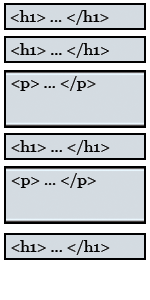
Block Element DiagramIt is very important to enclose all of your code into a series of block elements. Everything on your page should be enclosed by a Header or Paragraph Tag. If you do that, not only will you be xHTML compliant you’ll also have no problem with positioning your content.

If you forgot, here is a list of every block element tag:

<blockquote> : Block Quote
<div> : A block container that we’ll talk about soon
<dl> : Definition list
<form> : Form
<h1>, <h2>, … <h6> : Header Tags
<hr> : Horizontal Rule
<ol> : Ordered List
<p> : Paragraph
<table> : Table
<ul> : Unordered List Continue reading Adding CSS Style to HTML: Layout & Positioning

Adding CSS Style to HTML: The Box Element

The Box Element

Cascading Style SheetsIn the last article, I showed you how to style just about everything with Cascading Style Sheets. In this article I’ll cover everything there is to know about the box element.

CSS treats everything as if it was a box. Every box has the following properties:

Content Area: Which holds all of your content including text, images, etc.
Padding Area: Blank area that lies between the Content Area and the Border
Border: Optional line, that lies between the Padding and Margin
Margin: Optional area, that surrounds all of the other parts of the box.

Examples of How to Edit Boxes with CSS

Here I’ll give you many examples to pick from. Think of it as a cookbook of box designs. Continue reading Adding CSS Style to HTML: The Box Element

Adding CSS Style to HTML

Using CSS to Style your Site

Cascading Style SheetsIf you have watched my HTML Tutorials your probably asking yourself, “When is he going to talk about CSS?” Well, today is the day. Cascading Style Sheets (CSS) are used to completely control the look and feel of your website.

When HTML was merged with xml to become xHTML, CSS took off because now we were able to create our own tags and the possibilities became endless. You define how you want to add style to your pages in one of two ways. You embed the CSS styling rules directly into the xHTML file or you link to an outside CSS file. It’s better to link to an outside file so through out this course that is what we’ll do. Continue reading Adding CSS Style to HTML