Category Archives: Most Popular

Here are my most popular posts

I Trained Myself to Sleep 3 Hours a Day

Polyphasic SleepRecently in a livestream I told the story of how I trained myself to sleep just 3 hours a day. A lot of people asked me to share it on YouTube, so here it is. In this video I cover exactly what happened over a 10 day period. What is Polyphasic Sleep? I answer a ton of questions that I received during the livestream. How I transitioned over the last 25 years to live on just 3 to 4 hours of sleep per day every day.

I have livestreams every Tuesday & Wednesdays at 5PM UTC / Noon EST here : https://www.twitch.tv/derekbanas Continue reading I Trained Myself to Sleep 3 Hours a Day

Every Article

Most Searched for WordsEvery once in a while I take a deep breath and reorganize my whole site. I never would have imagined that in 3 years I would have created over 700 articles and 500 videos.

So, here I have every article and video organized. I’ve added a new category for just WordPress Theme Development since I’ve made over 50 articles / videos on that subject alone.

Feel free to submit your tutorial requests below. Everything I make is based off of the requests that you make.

Continue reading Every Article

Index for New Think Tank

Most Searched for WordsHere is the whole New Think Tank Website organized for your convenience.

Marketing Article’s

Web Design Article’s

WordPress Article’s

Psychology / Indirect Hypnosis / NLP Article’s

Sales Article’s

Dieting Article’s

Recipe’s

Investing Article’s

Miscellaneous


Table of Contents

Most Searched for WordsI’ve been getting request’s that I better organize my site. So, here is my whole site organized into nice little pieces.

You guys define what I write about. If there is something specific you’d like me to cover leave a comment below. Don’t think your limited to just topic’s that I’ve covered either. I’m open to research pretty much anything.

Continue reading Table of Contents

How to Lose Weight: Best Foods & Common Food Myths

Diet Nutritional, Nutrition HeartMaxine wrote in and said, “While it’s great that you lost 78 pound’s, you have to understand that starving yourself can have serious health threats. You have to understand that a woman’s hormone’s also make it very hard to lose weight in comparison to men.”

I agree with the starving yourself part Maxine, but I don’t starve myself, I just eat between 75% to 80% of the calories my body requires to maintain my optimum weight. Your body only goes into starvation mode if you eat less than 55% of your required calorie intake. In a previous article I covered how to calculate that number, but I’ll do it again here.

Continue reading How to Lose Weight: Best Foods & Common Food Myths

How to Video Blog

zefrank how to vlogI’m asked in the real world all the time the question, “How do I get rich on YouTube?” I have the answer for you today!

I have been studying all the big hitters for a while now. I will provide your answer and assume these things:

You are not extremely attractive, even though you are I’m sure!
You are not an amazing videographer.

Your not afraid to show your face.

You have a good personality!

If the above apply, you are in luck. As I studied all the most successful Vloggers, I came across one true shining star. His name is ZeFrank. He is, in my opinion, the greatest vlogger ever. He is probably the most successful vlogger as well. And, all the successful YouTubers seem to copy from him, to one extent or another.

Here is a sample of ZeFranks work. Note: If you are offended by a little swearing don’t watch this video. He swears a little.

[quicktime]http://www.mybusinessbuilders.net/Images/HowtoVideoBlog.m4v[/quicktime]

ZeFrank studied neuroscience, by trade and I think he applied everything he knows about the brain to his videos. I’ll now break down all the techniques he uses. To become successful, just copy as many techniques as you can.

Opening

  • He normally starts off every video by acting as if he is trying to chase away new viewers. This creates a feeling that you are in a private club with him. “Are the new viewers gone yet?” (Very Powerful Psychologically)
  • He then addresses you as a club member. (All his club members are called Sports Racers)
  • He refers to himself as Ze, ZeFrank and Knowledge.
  • Often shows a user submitted version of his logo, which is a rubber ducky. (Involves the viewers in the show and who doesn’t like rubber ducks?)

How to Video Yourself on YouTube so Viewers will Love you

  • He always videos his face up close, so that he fills the screen. (Easier to associate with him, because people normally watch small versions of the video on their computer.)
  • He edits his clips down so that there is a constant stream of words. (Doesn’t allow the viewers mind to wander.)
  • Edits out the blinking. (Might be something psychological to this?)
  • Moves his head between edits so that he is constantly moving in the video. (Keeps the viewers attention)
  • Talks to the viewer as if they are having a personal conversation. (Builds the relationship)
  • Tells the viewer he likes them and that they are friends. (Builds the relationship)
  • All videos are 3 to 3 1/2 minutes in length. (Optimum time so the viewer doesn’t get bored. Never go over 4 minute’s in length!)

How to Get More Comments on YouTube

  • Involves viewers by reading their comments. Titles this part of the vlog, showing its added importance. “Something from the comments”
  • Reads the comment from the last person to post a comment. (Creates an atmosphere in which viewers are fighting to make the last comment. Hence, tons of comments are posted.)

How to Get More Ratings on YouTube

  • If you are the last person to comment and you gave the video a good rating, you become the “King or Queen of the Comments!” (Now visitors are inclined to not only comment, but also to provide a good rating)

How to Get Video Responses on YouTube

  • If a viewer video tapes themselves performing a power move, they may be inducted into “The League of Awesomeness!” (Increases the number of video responses)
  • Once a person makes it into the League of Awesomeness, they also get a special code name.

Increase Viewer Activity on YouTube

  • Creates fun games that viewers can participate in like the “Earth Sandwich Project.” Here viewers team up to place a piece of bread on the ground at the exact opposite sides of the Earth.
  • Shows clips from other influential vloggers. Then people comment that they saw their video on the ZeFrank show. Then those people go to watch the ZeFrank show. (Technique used to infiltrate other popular Vlogs.)
  • Provides the viewers with the opportunity to create the format of his show. “Fabuloso Friday”

Build a Community of Viewers on YouTube

  • Sells T-Shirts emblazoned with the Sports Racer logo, that was created by fans.
  • Gives away Sports Racer ringtones, with the Sports Racer theme song.
  • Posts on a daily basis. (Creates a daily routine, where the viewer has to watch the new ZeFrank show.)
  • Use odd phrases that make the viewer feel like an insider. “Yes no I this is”, “I’ve got the walnuts, show me the baby”, etc.

How to Format an Interesting Show on YouTube

  • Mix serious news with comedy. (Some people like news, some like comedy, but everyone likes ZeFrank.)
  • Takes viewers on trips to places they may not have the opportunity to visit.
  • Created music videos that explained the news or where just pure comedy.
  • Break the show down into pieces that have a short theme song and funny name. “Things I like that are gay”, “Say the opposite”, “Something from the comments”, etc.
  • Attack someone that the general public doesn’t like. In ZeFrank’s case, he attacked George Bush.
  • Tell funny stories about photos. “President Bush pictured here wishing he had a mustache”, “Alberto Gonzalez pictured here patting the invisible man on the back”, etc.
  • End the show with an interesting closing, to reestablish the brand. “This is ZeFrank, thinking so you don’t have to.”

Other Random ZeFrank Vlogging Techniques

  • Talks to imaginary co-workers.
  • Posts video’s of his mistakes.

Other Vlogger Tricks

  • Another trick people use to get more views, is to post an opening title screen that is interesting. “Celebrity”, “Odd photo”, etc.
  • Obviously, an interesting title will draw attention.
  • Many attractive Vloggers get away with just being attractive.
  • The more videos you post, the better chance you have of hitting on a subject the masses may be interested in.

Wrapping Up

That’s pretty much everything I learned from watching the best Vloggers. I don’t necessarily think ZeFrank planned to do all that he did to trick people into watching him. I instead think he aimed to create a very entertaining show. In my opinion and in the opinion of millions, he succeeded.

Post a comment below to become “The High Muckity Muck of the comment’s.”

Here to Serve

Think Tank

Make a Website Video Tutorial

Make a Website Video TutorialHere I have combined all of my website tutorial’s in to one place. If you want, you can learn how to design website’s, using this tutorial. There are 71 Free Video’s in all. This video provides link’s to all of the video’s through YouTube, or you can select the video you want to watch from the list below.

These tutorial’s and the code that belongs with them, is here on New Think Tank.

Continue reading Make a Website Video Tutorial

JQuery & Ajax Free Video Tutorial

JQuery Video TutorialIn this series of tutorial’s I will show you how to use the amazing JQuery Framework. Not only that, but I’ll show you how to use it to master your Ajax techniques.

If you don’t know, Ajax is an approach to using HTML, JavaScript, DHTML, and the DOM. It allows you to create interactive web applications. When Ajax is implemented with JQuery, you dramatically decrease the complications of implementing AJAX techniques.

Briefly, you will learn:

  • How to Select and Edit Element’s without a page reload
  • How to perform many animation’s live on the screen
  • How to pull text from the server
  • How to pull XML data from the server
  • How to communicate with php script’s on the server, without a reload
  • Many fast ways to perform normally complicated JavaScript tasks
  • And, much more…

Continue reading JQuery & Ajax Free Video Tutorial

Free XML Video Tutorial Series

Here I present a video version of my XML Tutorial. I went out of my way to cover nearly all of the capabilities provided to you with XML. If you have any questions or want further information, leave a comment below.

Learn XML Video Tutorial Part 1

Here I introduce XML by covering:

  • XML Basics
  • Explain what it can do
  • Compare it to HTML
  • Explain tags and elements
  • Show you what XML looks like
  • Explain the encoding attribute
  • much more…


Continue reading Free XML Video Tutorial Series

Javascript Video Scripting Tutorials

Here are all of my Javascript Video Scripting Tutorials and Javascript articles. I hope you find it to be useful.

Index to Articles on Javascript:

Continue reading Javascript Video Scripting Tutorials

CSS Menu Drop Down

A few articles ago I showed you how to make a basic website layout in my Styling HTML with Cascading Style Sheets Tutorial. Was it the most beautiful page? Not exactly, but it was easy to understand, which was the point in making it simple. Here it is if you missed it.

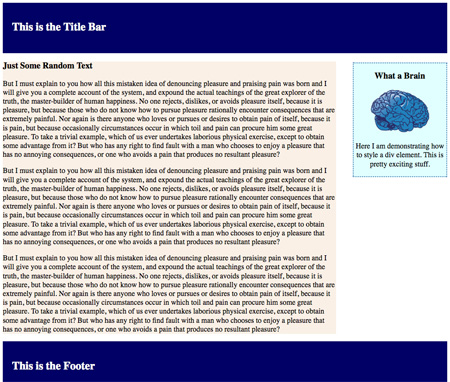
Simple Two Bar CSS LayoutClick here to be taken to the web page to your left.

Feel free to do whatever you like with the code and if you have any problems editing it drop me a comment below.

So, we have a simple layout with a title bar, footer, side bar and main content div setup. This is the basic layout used for all WordPress themes. And, yes I am going to create a tutorial on designing custom WordPress themes very soon.

Continue reading CSS Menu Drop Down

How to CSS Style HTML Video Series

A Complete CSS Video Series for Free

Note: Click the High Definition Button and Full Screen Button, to see these videos at the highest quality level.

I hope everyone enjoyed the series of articles I wrote recently on CSS. You definitely could add CSS Expert to your resume if you read the whole thing. But, where are the videos? I’ve assembled 6 videos below that go through every subject covered in the articles. I hope you enjoy them. (Hint: Comment Below)

If you haven’t read my Complete HTML W3C Tutorial, you should do that first.

How to CSS Style HTML, Video 1

[youtube]http://www.youtube.com/watch?v=XZOfG4moMx4[/youtube]

In this video:

1. I introduce Cascading Style Sheets

2. I show you how to add CSS to your HTML code

3. I go over how changing one tag, effects the other tags.

4. Then I go over CSS classes.

5. How to edit CSS class properties

A whole lot more…
Continue reading How to CSS Style HTML Video Series

Learn How to Write HTML W3C

[youtube]http://www.youtube.com/watch?v=Ncy6LDjSiX4[/youtube]Today, I’m going to completely explain the Hyper-Text Markup Language (HTML). You’ll probably be surprised by how uncomplicated it is. I hope?

A web browser reads HTML, which is just a text file filled with tags. Tags are just words or individual characters in angled brackets, that tell the browser what test needs emphasis, is a paragraph, where to get images, how to take a visitor to another page, etc. There are 89 total tags, but most of the time you will use only 20 total tags. Here are the most common tags:

  • <!DOCTYPE> : Defines what type of document your using. This will almost always be the same on every HTML page you ever create.
  • <a> : Defines a link, that if clicked will take the user to another web page
  • <b> : Tells the browser, you want the text inclosed to be bold.
  • <body> : Your main content will reside between to body tags
  • <br /> : Creates a line break.
  • <em> : Italicizes the text between these tags.
  • <form> : Defines an area in which the visitor can interact with your website.
  • <h1> to <h6> : Defines text that you want to emphasize, such as a title.
  • <head> : You describe the content of the document, between to head tags.
  • <hr /> : Draws a horizontal line on your web page, to separate content.
  • <html> : Defines the beginning and ending of your html page.
  • <img /> : Tells the browser, you want to insert an image.
  • <li> : Defines an item in a list, you wish to bullet, or number
  • <ol> : Tells the browser, an ordered list is about to be defined
  • <p> : Defines that a paragraph of text is being defined.
  • <table> : Tells the browser, you’d like to present your information in table format.
  • <title> : Defines the title of your document
  • <ul> : Tells the browser, an unordered list is about to be defined

Continue reading Learn How to Write HTML W3C

I’m not a Nutritionist, but I Lost 35 lbs in 2 Months, The Healthy Way

[youtube]http://www.youtube.com/watch?v=4K3WiHFiQ5E[/youtube]I got on the scale on October 20th and was shocked to see that I weighed almost 250 lbs. I weighed 248 lbs to be exact and I decided I was ready to lose weight now.

All the diet books I read were either too vague or proposed I go on a diet that was either very expensive, time consuming, or disgusting. I had lost weight in the past, but I knew I had done it in unhealthy ways. I decided to look at how my diet in college differed from my current diet first off.
Continue reading I’m not a Nutritionist, but I Lost 35 lbs in 2 Months, The Healthy Way