Category Archives: Web Design

Design To Website, Blog How To Set Up, Google Update Pagerank, Google Crawl, Free Submit Site

AJAX What is it? How to AJAX Pt. 2

In the last article, I explained what AJAX is and showed you how to dynamically change the text in DIV’s and SPAN’s without reloading the page. In this article I’ll show you how to place text from your server in DIV’s and SPAN’s, without reloading the page.

All About Events

Most of the time you will bring data onto your web page when an event has been triggered. So I thought it would make sense to list all of the events you can monitor: Continue reading AJAX What is it? How to AJAX Pt. 2

AJAX What is it? How to AJAX Pt. 1

There is much confusion concerning Asynchronous JavaScript and XML (AJAX). First off AJAX is not a programming language. It provides a new way for you to use the languages I’ve taught you in previous tutorials:

  • HTML
  • Cascading Style Sheets
  • JavaScript
  • PHP
  • XML

AJAX provides you with the ability to:

How to Code PHP: Activate Account & Multiple Drop Down Scripts

Here I’ll show you the code that will allow a new user to activate their account and how to create multiple drop down boxes that automatically update. This should be a wild ride so let’s learn How to Code PHP.

PHP Activate Account Script

Obviously, you are going to need to connect to the database and include all of the HTML needed. See my first How to Code PHP Tutorial for that information. I’m just going to include the PHP code for the activation script to keep the article brief.

Here I’ll show you the code that was used on the New User Registration page. This code created the account and then sent the email, that the user will click to get to your activation page. Continue reading How to Code PHP: Activate Account & Multiple Drop Down Scripts

Complete SQL Statements Video Tutorial

Today I present the whole SQL Statements Tutorial Video Series. I did my best to make sure, after you watch this series of videos, you will be an expert at programming with SQL. Please leave any comments and questions below.

[youtube]http://www.youtube.com/watch?v=WV04VAaQVRA[/youtube]

MySQL SQL Statements Tutorial 1

Here I explain what SQL is & show many statements in SQL. I explain:

  • What a Database is
  • Why you should use MySQL
  • What SQL is
  • Explain what a Relational Database Management System (RDMS) is
  • Show you how to Create a Table
  • Explain every SQL Data Type (Numeric, Character, Date, etc.)
  • Give you an Overview of what you’ll Learn in this Video Series

Continue reading Complete SQL Statements Video Tutorial

How to Code PHP Sessions & Cookies

In this article I’m going to talk about using cookies and sessions in PHP. I’ll provide many examples to help you learn how to code PHP and then in the next article run you threw some PHP code you can use on your own sites.

Cookies & Sessions

There are two main ways for you to store information on your visitors and create a dynamic site. Cookies are used to store information on the visitors computer. Much like you do with arrays, cookies are stored as a key value pair.

Many people are afraid of cookies, because they think those websites that use them are tracking their every move. For this reason it may be hard to serve up the dynamic content that you want. There are work arounds for those visitors that have cookies shut off as you’ll soon see. Continue reading How to Code PHP Sessions & Cookies

How to Code PHP Part 2

Welcome to the second part of the How to Code PHP Tutorial. In this article I’ll show you the rest of the basics of using the PHP Engine. I’ll cover the following:

  • IF Statements
  • SWITCH Statements
  • FOR Loops
  • WHILE Loops
  • DO WHILE Loops
  • Including Files
  • Creating Functions
  • What Does Scope Mean?
  • Date and Time Functions
  • How to Send Email
  • Accessing Databases

Continue reading How to Code PHP Part 2

How to Code PHP Part 1

Do you want to learn How to Code PHP? Get your thinking caps on and let’s start cranking the PHP Engine.

PHP is a programming language that allows you to process and react to user actions on your website. While JavaScript allows you to process actions directly on a visitors computer, PHP requires that actions are processed on the server in which your website resides.

PHP is most commonly used to access databases on the server that hosts your website. Please read my SQL Tutorial before you read this article, or you may get lost. This tutorial will cover most all you can accomplish with PHP, but will very specifically cover how to interact with a database with PHP.

The Basics of PHP

Like my other tutorials, I will provide you with working PHP Sources you can use, but for now I’ll focus on the basics.

You can embed PHP code directly in your web pages by surrounding the code with an opening <?php and closing tag ?>. You also want to give your web page the PHP extension .php, when you embed PHP code in a web page. Continue reading How to Code PHP Part 1

MySQL & Statements in SQL

There are many misconceptions when it comes to databases:

  • Some people think they are hard to develop (Not True)
  • Many people think they are expensive (There are Free Versions Available)
  • Most people don’t know how to start using them (You’re in the right place)

In the next series of articles I will show you how to use mySQL. A completely free database server that many consider to also be the best. Heck, NASA uses MySQL.

So do you need one?

If you answer any of these questions affirmative, the answer is yes:

  • Do you have trouble managing your data, because it is unorganized
  • Do you have massive amounts of data that is too complicated to store in a spreadsheet
  • Would you like to provide access to your data on the internet
  • Would you like to be able to sort through and analyze your data

Continue reading MySQL & Statements in SQL

Javascript Video Scripting Tutorials

Here are all of my Javascript Video Scripting Tutorials and Javascript articles. I hope you find it to be useful.

Index to Articles on Javascript:

Continue reading Javascript Video Scripting Tutorials

Javascript Scripting Tutorial: Built in Functions

In this article, I’ll list all of the built in functions available to you with Javascript. While not everything will be covered, I will cover every function that is used on a regular basis. I’m still deciding whether I’ll cover Javascript Graphics or AJAX next. Leave comments below to help me understand. On to the functions.

Javascript Array Functions

In previous articles I described how to create Arrays, but if you forgot here is how you create arrays:

  • var a = new array() // Creates an empty array
  • var b = new array(8) // Creates an array with 8 element cells
  • var c = [1, 2, “turtle”, “number”, true]; // Creates an array with a bunch of random values

Javascript Array Properties and Functions

  • b.length // A property that would return the value of 8, because of the array declaration above
  • c.concat(3,4) // The array c now has the values 1, 2,  “turtle”, “number”, true, 3, 4
  • c.join(“: “) // Returns a string with each element separated by a colon and a space. 1: 2: number: true
  • c.slice(0, 2) // Returns an array which contains all elements between the first value you pass to the second value. In this example you would be returned [1, 2, number]
  • c.sort() // Returns the array elements in alphabetical order. This example returns [1, 2, number, true, turtle]
  • c.toString() // Converts the array into a string and then returns the string.

Continue reading Javascript Scripting Tutorial: Built in Functions

Javascript Scripting Tutorial Pt 5

Error Handling in Javascript

I’ve covered most everything you need to know to program in Javascript except for Error Handling. So, in this article I’ll explain how to handle those nasty errors when they crop up.

An exception is thrown whenever an error occurs in your code. You can set up your code in a way, so that it throws exceptions that you have a pre-built solution for. Let us say one of your functions divides numbers. We all know that dividing into zero produces a result of infinite. So, it would be a good idea to head off a zero division. How would you do that?

You would write some code that throws the exception or error and then catch and respond to such an error. The throw statement follows this style: throw expression;

Normally, the value of the expression is a string that represents what error caused an exception to be thrown. Ex. throw new error(“A division by zero occured”); Continue reading Javascript Scripting Tutorial Pt 5

CSS Menu Drop Down

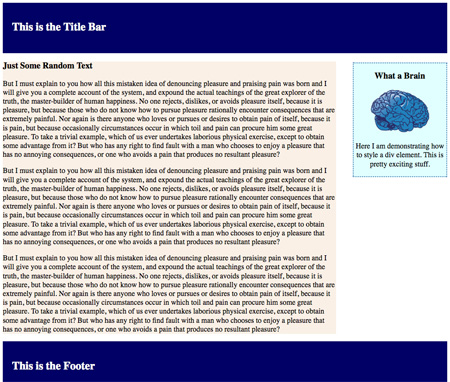
A few articles ago I showed you how to make a basic website layout in my Styling HTML with Cascading Style Sheets Tutorial. Was it the most beautiful page? Not exactly, but it was easy to understand, which was the point in making it simple. Here it is if you missed it.

Simple Two Bar CSS LayoutClick here to be taken to the web page to your left.

Feel free to do whatever you like with the code and if you have any problems editing it drop me a comment below.

So, we have a simple layout with a title bar, footer, side bar and main content div setup. This is the basic layout used for all WordPress themes. And, yes I am going to create a tutorial on designing custom WordPress themes very soon.

Continue reading CSS Menu Drop Down

Javascript Scripting Tutorial Pt 4

In the previous tutorials we covered just about everything there is to know about Javascript. If you missed those, the first article in the Javascript Scripting Tutorial can be found here.

In this article we will cover Cookies. Just so you know what to look forward to, we will finish off the whole tutorial by learning how to create an interactive menu and handle errors. Then you’ll be a Javascript expert.

Cookies

With cookies it is possible to store information on a visitors computer so you will recognize them when they return in the future. A cookie is simply a tiny text file (4k) that is stored on a client’s computer. You can only store a total of 20 cookies per computer. You define how long they will stay on that computer, but the visitor can force them to be deleted at any time. Continue reading Javascript Scripting Tutorial Pt 4

Javascript Scripting Tutorial Part 3

Javascript Tutorial Regular Expressions, Form Validation and Event Handlers

Today I’m going to continue teaching you everything about Javascript. If you haven’t read my other Javascript tutorials they are available here:

You must read these tutorials before you have any hope of understanding the code that is coming. Like in the last tutorial I will teach you Javascript by walking you through a working script. As the title says above, this tutorial will focus on Regular Expressions, Form Validation and Event Handlers.

Regular Expressions

A Regular Expression is used to describe a series of characters, numbers and symbols. Regular expressions are used to verify that a visitor to your site entered a correct phone number or address. You would use a Regular Expression to state that the phone number:

Free Javascript Scripting Tutorial Part2

In this article I’ll explain Javascript Scripting. If you haven’t read my previous article on Javascript Scripting you should read it first. It provides a brief overview on the capabilities of Javascript. Here is the location of the code you’ll be working with, to see what you’ll learn. Here I’ll run you through some Javascript code and explain the following:

Continue reading Free Javascript Scripting Tutorial Part2

What is Object Oriented Programming

[youtube]http://www.youtube.com/watch?v=OQjPcS1tkDQ[/youtube]Welcome to a brief tutorial on what is Object Oriented Programming (OOP) and why the object oriented approach is considered the best way to program. Objects programming has taken the world by storm because of its flexibility and understandability, but learning the concepts behind it are sometimes a bit daunting. I will do my best to explain it in the simplest of terms. I assume you have a minor understanding of programming in this article, but if not, you can read my Javascript Scripting Tutorial to get prepared.

What Are Objects in Object Oriented Programming

A while back when a programmer sat down to write a program he/she would first ask “What does this program have to do?” They would then create a program that was filled with one action after another. This is known as procedural programming.

Now most programmers instead ask themselves, “What things are in this program?” Then they write code that explains what functions these things (objects) should be able to do. This is known as Object Oriented Programming (OOP).

Let’s say you are told to create a program that copies the functionality of a car. Here is a basic example of how you might do that with procedural programming versus OOP. Continue reading What is Object Oriented Programming