Free XML Video Tutorial Series

Here I present a video version of my XML Tutorial. I went out of my way to cover nearly all of the capabilities provided to you with XML. If you have any questions or want further information, leave a comment below.

Learn XML Video Tutorial Part 1

Here I introduce XML by covering:

  • XML Basics
  • Explain what it can do
  • Compare it to HTML
  • Explain tags and elements
  • Show you what XML looks like
  • Explain the encoding attribute
  • much more…


Continue reading Free XML Video Tutorial Series

Learn XML Schema

In this article I’ll describe the most complicated aspect in XML. A XML Schema is another way you can represent how a XML document file defines data, elements and attributes.

How Schema’s Differ from DTD’s

Unlike DTD’s, which are great when you are mainly working with text elements, Schema’s work best when your mainly working with data elements.

Schema’s also work better when you want to be certain that the proper data is entered. Schema’s define what type of data each element and attribute can hold. For example, with a XML Schema you can specify you will only allow a price element to be of the form of a certain number of numbers followed by a period and then two additional digits. Continue reading Learn XML Schema

How to Reinstall WordPress After Hack

Ok, you’ve been hacked. Stay calm your information is not going to be lost forever. At best you’ll be able to restore everything by just reinstalling wordpress through the Go Daddy interface. At Worst you’ll have to backup a few things, then reinstall WordPress, Themes and Plugins. In this article I’ll walk you through the process.

The Easy Way to Reinstall After a Hack

See my previous tutorial. If that doesn’t fix everything then your in the right place. What you have to understand is that hackers leave their nasty code in your plugins or themes mostly all of the time. So we have to delete and reinstall those.

There is an easy way to do this if you have a Go Daddy Account. Continue reading How to Reinstall WordPress After Hack

Learn XML Document Type Definition’s

As I explained at the end of the last article. You create a Document Type to define the rules that must be followed in your XML Markup. A DTD defines what elements are required and what attributes can be set and what their potential values can be.

Every DTD must start with the line <?xml version=”1.0” encoding=”UTF-8” standalone=”no”?>. This tells the processor that this is an XML version 1.0 file. The character encoding used is of type UTF-8. And, that no external file is required for this document to work.

Also make sure that when you are creating DTD’s that !ELEMENT, !ATTLIST, #REQUIRED, #PCDATA, #CDATA, etc. are all capitalized.

There you are all up to speed. Now on to DTD Prologs… Continue reading Learn XML Document Type Definition’s

Check or Scan Website for Malware and Viruses

There is nothing worse than having your website flagged by Google for containing Malware. Thankfully, there are many free tools you can use to protect your site from Malware and Viruses. In this tutorial I’ll show you how to protect yourself. For further information on fixing a hacked website click here.

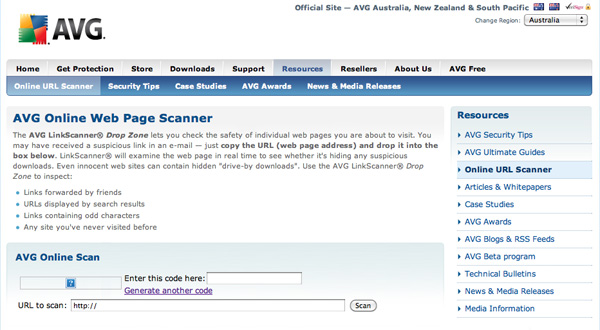
Free AVG Web Page Scanner

AVG LinkScanner will check any web page for suspicious code. To use this tool go to http://www.avg.com.au/resources/web-page-scanner/

AVG Scan or Check Website for MalwareThis is a real time check of the page, not a dated previous check, which is very nice. You can click the image to the left for a larger view.

Just type in the captcha code and the web page you want to analyze and hit the scan button. Hopefully your happy with the results that are returned?

AVG also offers free virus protection for your computer on their site. Continue reading Check or Scan Website for Malware and Viruses

Learn XML eXtensible Markup Language Pt 2

In this tutorial I’ll continue to cover XML and all of it’s capabilities. XML stands for eXtensible Markup Language. I hope you got this one point from the last XML Article. XML does one thing really well. It organizes and classifies your data, so that it is useable by a wide range of devices and software packages!

In this article I’ll explain how XML influenced HTML, to create the newest version of HTML called XHTML. I’ll then explain what well formed XML is and Document Type Definition’s (DTD).

Continue reading Learn XML eXtensible Markup Language Pt 2

Learn XML eXtensible Markup Language

In the next set of tutorials, I’ll completely cover XML and all of it’s capabilities. XML stands for eXtensible Markup Language. I’ll get back to the extensible part in a minute.

First you have to understand that XML is no more a programming language than HTML is. Let me repeat that. XML is not a programming language, it is a Markup Language that is very similar to HTML. If you don’t understand HTML, stop reading this article and instead read or watch my HTML W3C Tutorial.

People really struggle to understand exactly what XML is and I’m going to explain it in an unconventional way that has never failed in the past. I’ll explain XML, by comparing it to HTML. Continue reading Learn XML eXtensible Markup Language

How to Setup Go Daddy Email

I get asked this question almost weekly, so I’m going to provide you with the step-by-step way to set up your email on Go Daddy.

How to Setup Your Email on Go Daddy

  1. Login to your Go Daddy Account and hit Go
  2. Click on My Products in your left side bar
  3. Click on the link labeled Email under My Products
  4. There will be a yellow box in the middle of the screen that opens. Click on the link called Use Credit, which is next to the words Personal Email
  5. On the page that opens, you’ll see in your right side bar a box labeled Setup Free Account. Under that green box click on the domain name you want to setup your email account with and click the Continue button under that. Continue reading How to Setup Go Daddy Email

JavaScript Frameworks

If you have been programming in JavaScript, you have heard about all the frameworks available. The most popular frameworks are:

  • Prototype
  • JQuery
  • MooTools
  • Scriptaculous

I’ve been pondering whether I was going to cover frameworks on my site because while I have used them, I prefer to write and reuse my own code. So, in this article I’m going to go through the pro’s and con’s of using frameworks. Continue reading JavaScript Frameworks

How to Code PHP Scripts Video Tutorial

In this series of video’s I take you to the next level in learning How to Code PHP. I’ve included many PHP tutorials on the most in demand PHP scripts including:

  • How to Code a PHP Simple Login Script
  • How to Code a PHP New User Registration Script
  • How to Code a PHP Quality Login Script
  • How to Code a PHP Forgotten Password Script
  • How to Code a PHP Account Activation Script
  • How to Code a PHP Automatic Updating Multiple Drop Down Boxes Script Continue reading How to Code PHP Scripts Video Tutorial

Moving from Analog to Digital TV Tuner

[youtube]http://www.youtube.com/watch?v=rJwWDS8p7qE[/youtube]A year back there was constant talk about the move from an Analog to Digital TV over the air broadcast.I like many others with cable didn’t care because we already had cable. But, a month ago I realized I didn’t watch much except the major networks and decided to look into buying a Tuner Analog to Digital Converter for my TV.

All I can say is wow! I never thought the picture would be nice, but I think it is better. I still get ABC, NBC, FOX, CBS, CW and numerous public broadcasting channels, with the Digital TV Tuner. Also I only needed to buy an antenna for my digital TV. My regular analog TV, obviously needed the Analog to Digital TV Tuner and the antenna. Continue reading Moving from Analog to Digital TV Tuner

Did your WordPress Site Get Hacked?

[youtube]http://www.youtube.com/watch?v=-hNdCIpMI58[/youtube]After you create a website that gets a good amount of traffic you will start to attract hackers. It will happen! My high ranking sites have all been attacked and it’s almost impossible to stop, but it is quite easy to recover.

My site is hosted on Go Daddy and it is definitely not a Go Daddy related problem, as I have had sites hacked on other hosting companies. The reason I have all my sites on Go Daddy now is because Go Daddy has given me the easiest solution to fixing a hacked site. They actually helped me fix everything for free.

In this article I’ll show you how easy it is to recover from a hacker attack. Continue reading Did your WordPress Site Get Hacked?

AJAX What is it? How to AJAX Pt. 2

In the last article, I explained what AJAX is and showed you how to dynamically change the text in DIV’s and SPAN’s without reloading the page. In this article I’ll show you how to place text from your server in DIV’s and SPAN’s, without reloading the page.

All About Events

Most of the time you will bring data onto your web page when an event has been triggered. So I thought it would make sense to list all of the events you can monitor: Continue reading AJAX What is it? How to AJAX Pt. 2

AJAX What is it? How to AJAX Pt. 1

There is much confusion concerning Asynchronous JavaScript and XML (AJAX). First off AJAX is not a programming language. It provides a new way for you to use the languages I’ve taught you in previous tutorials:

  • HTML
  • Cascading Style Sheets
  • JavaScript
  • PHP
  • XML

AJAX provides you with the ability to:

How to Code PHP: Activate Account & Multiple Drop Down Scripts

Here I’ll show you the code that will allow a new user to activate their account and how to create multiple drop down boxes that automatically update. This should be a wild ride so let’s learn How to Code PHP.

PHP Activate Account Script

Obviously, you are going to need to connect to the database and include all of the HTML needed. See my first How to Code PHP Tutorial for that information. I’m just going to include the PHP code for the activation script to keep the article brief.

Here I’ll show you the code that was used on the New User Registration page. This code created the account and then sent the email, that the user will click to get to your activation page. Continue reading How to Code PHP: Activate Account & Multiple Drop Down Scripts

Complete SQL Statements Video Tutorial

Today I present the whole SQL Statements Tutorial Video Series. I did my best to make sure, after you watch this series of videos, you will be an expert at programming with SQL. Please leave any comments and questions below.

[youtube]http://www.youtube.com/watch?v=WV04VAaQVRA[/youtube]

MySQL SQL Statements Tutorial 1

Here I explain what SQL is & show many statements in SQL. I explain:

  • What a Database is
  • Why you should use MySQL
  • What SQL is
  • Explain what a Relational Database Management System (RDMS) is
  • Show you how to Create a Table
  • Explain every SQL Data Type (Numeric, Character, Date, etc.)
  • Give you an Overview of what you’ll Learn in this Video Series

Continue reading Complete SQL Statements Video Tutorial

How to Code PHP Sessions & Cookies

In this article I’m going to talk about using cookies and sessions in PHP. I’ll provide many examples to help you learn how to code PHP and then in the next article run you threw some PHP code you can use on your own sites.

Cookies & Sessions

There are two main ways for you to store information on your visitors and create a dynamic site. Cookies are used to store information on the visitors computer. Much like you do with arrays, cookies are stored as a key value pair.

Many people are afraid of cookies, because they think those websites that use them are tracking their every move. For this reason it may be hard to serve up the dynamic content that you want. There are work arounds for those visitors that have cookies shut off as you’ll soon see. Continue reading How to Code PHP Sessions & Cookies